

- Home
- »
- Features
Every Feature Your Books Need — Built for Multi-Location Operators
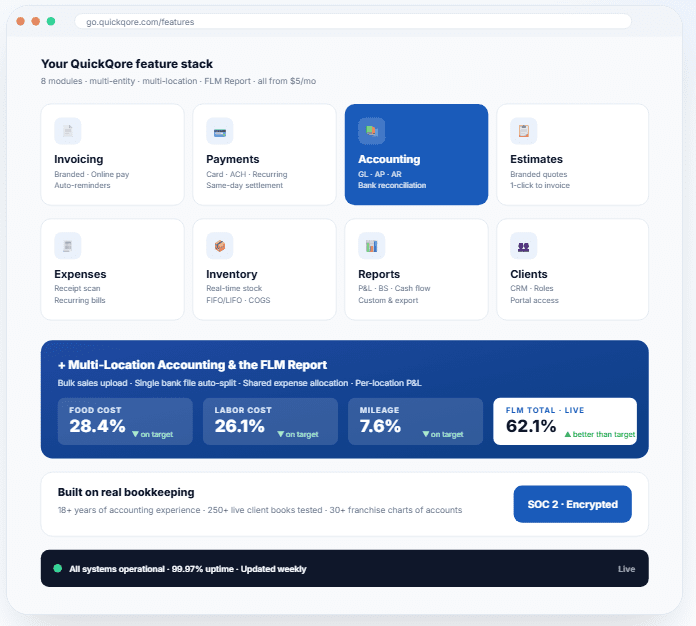
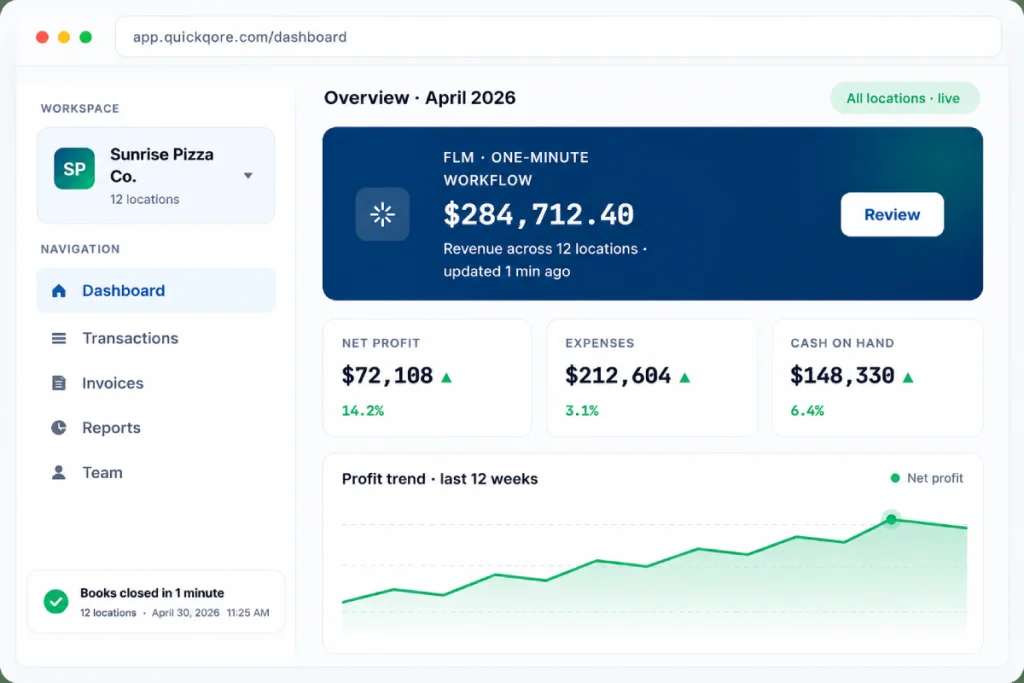
QuickQore bundles eight core bookkeeping modules with multi-entity and multi-location accounting built in — all in one cloud platform that looks and feels like the desktop software you already know. From a single shop to a 100-location franchise, every feature scales with you. Pricing starts at $5/month.
- No credit card required
- Multi-entity included
- Cancel anytime
Q
QuickQore features at a glance
Every bookkeeping job, in one platform
Eight tightly integrated modules cover the full cycle of small business accounting — from quote to invoice to payment to ledger to financial statement. No bolt-ons. No extra subscriptions.
Answer
QuickQore’s eight core bookkeeping modules — Invoicing, Payments, Accounting, Estimates, Expenses & Receipts, Inventory, Reports, and Client Management — replace four to six standalone SaaS tools small businesses normally stitch together. Every module ties into the same general ledger, so a sale, an expense, or a payment posts once and updates the P&L in real time.
Invoicing
Branded, customizable invoices with online payment links, automated reminders, and full status tracking.
Payments
Accept credit card, ACH, and recurring payments. Same-day settlement options. Built-in dispute handling.
Accounting
General ledger, AP/AR, bank reconciliation, and tax-ready financial statements — the desktop-style way.
Expenses & Receipts
Capture receipts, tag deductible spending, and automate recurring bills with a built-in vendor database.
Inventory
Real-time stock levels, low-stock alerts, FIFO/LIFO valuation, and cost-of-goods reporting.
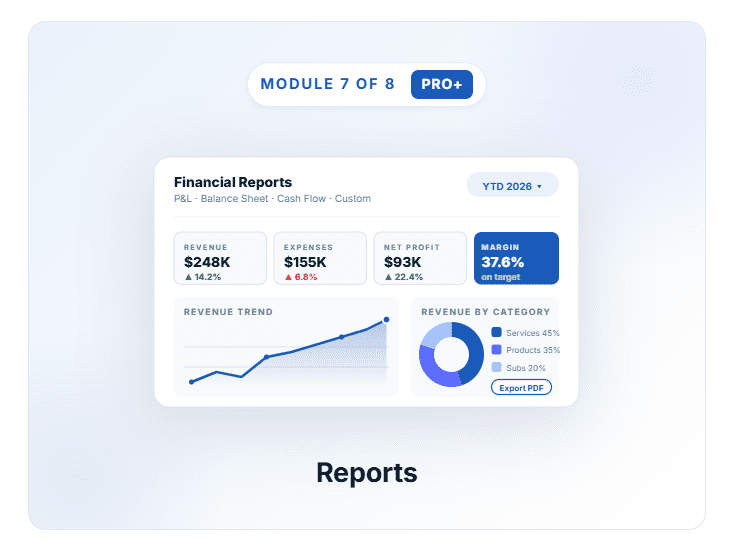
Reports
P&L, balance sheet, cash flow, sales-by-item, custom reports — export to PDF, Excel, or share by link.
Client Management
Built-in CRM with role-based multi-user access, document storage, and client portal sharing.
What each module actually does
No fluff. Here’s what you’ll actually use, day in and day out.
Answer
Each QuickQore module is a fully featured product on its own — with the speed and depth of legacy desktop accounting software, but delivered through a browser. Below, every module is broken down into what it does, what you’ll use day-to-day, and how it’s different from the same feature in QuickBooks Online or Xero.
Get paid faster with branded, automated invoicing
What is QuickQore Invoicing?
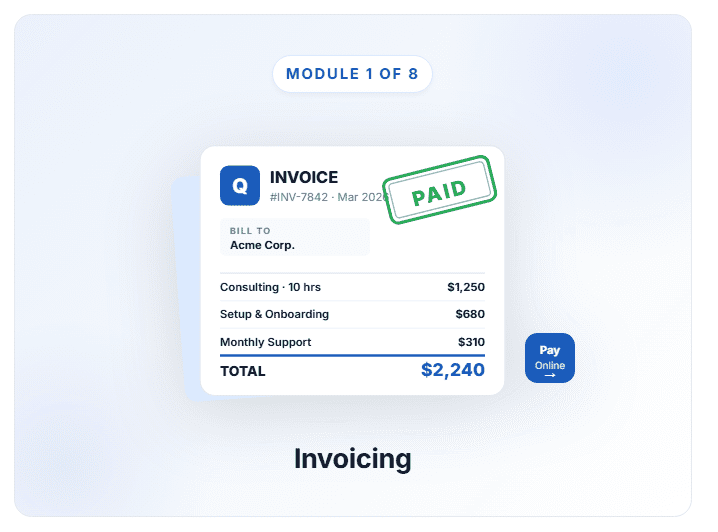
QuickQore Invoicing is a cloud invoicing module that creates branded, customizable invoices, accepts online payments directly from the invoice, and automates payment reminders — replacing three or four standalone tools. Status updates post to your general ledger the instant a customer pays.
QuickQore Invoicing replaces three or four common point tools at once: invoice templates, payment links, late-fee reminders, and statement generation. Build a quote, attach it to a customer, send it with a single click, and watch payment status update in real time.
- Customizable templates with logo, brand colors, and contact info baked in
- Online payment acceptance directly from the invoice (card, ACH, debit)
- Automated payment reminders for overdue invoices — you set the cadence
- Itemized line items by service, product, hours, or unit
- Status tracking & history — sent, viewed, paid, overdue, all in one view
- Multi-currency support for international invoicing on Pro and above
Accept any payment, settle any way
What is QuickQore Payments?
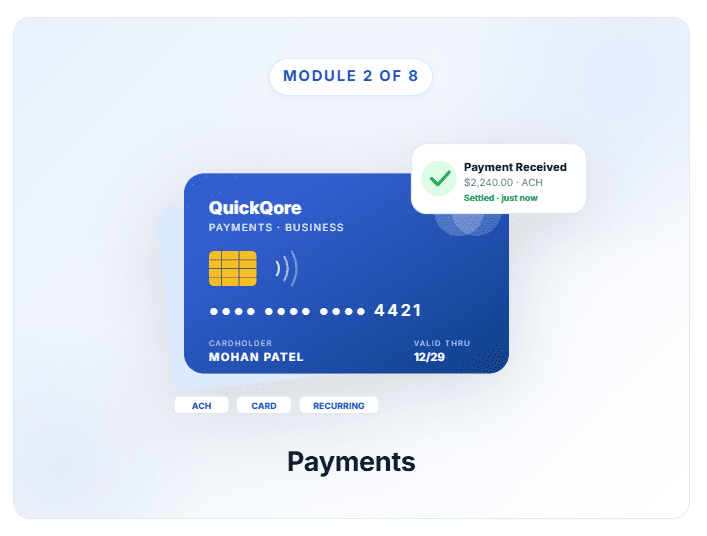
QuickQore Payments is a built-in payment processor that accepts credit card, ACH, and recurring billing natively — no Stripe account, no third-party gateway. Each payment posts straight to the right ledger account on the right entity, eliminating manual journaling and overnight reconciliation delays.
Stop juggling Stripe accounts, ACH portals, and payment processors. QuickQore Payments accepts every common payment method natively and posts each one straight to the right ledger account — no manual journaling, no reconciliation overnight delays.
- Credit card & debit card — Visa, Mastercard, AmEx, Discover
- ACH / direct debit for low-fee recurring payments
- Recurring billing with auto-renewal and dunning logic
- Same-day settlement available on Business and Enterprise plans
- Built-in dispute handling — respond to chargebacks from QuickQore directly
- Multi-entity payouts route funds to the correct entity bank account
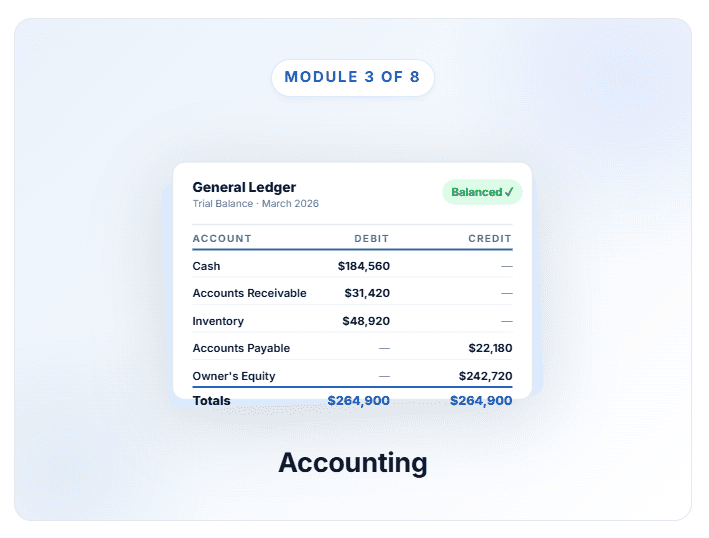
The full general ledger your CPA expects, the desktop-style way
What is QuickQore Accounting?
QuickQore Accounting is a real double-entry general ledger with full chart of accounts, AP/AR sub-ledgers, automated bank reconciliation, and tax-ready P&L, balance sheet, and cash flow statements. The desktop-style workflow your CPA learned on QuickBooks Desktop — delivered in the cloud at one-tenth the cost.
This is the heart of QuickQore. A real double-entry general ledger with full chart of accounts, account hierarchies, AP and AR sub-ledgers, bank reconciliation, and tax-ready financials. Same workflow your bookkeeper learned on QuickBooks Desktop — only the lock-screen and the cloud are new.
- General Ledger with full chart of accounts and unlimited account hierarchies
- Accounts Payable & Receivable with aging, credit memos, partial payments
- Bank reconciliation — auto-match transactions, split across multiple locations
- Tax-ready reporting — P&L, balance sheet, cash flow, ready for your CPA
- Pre-built charts of accounts for 30+ franchise brands and common SMB types
- Audit trail on every transaction with user, timestamp, and change history
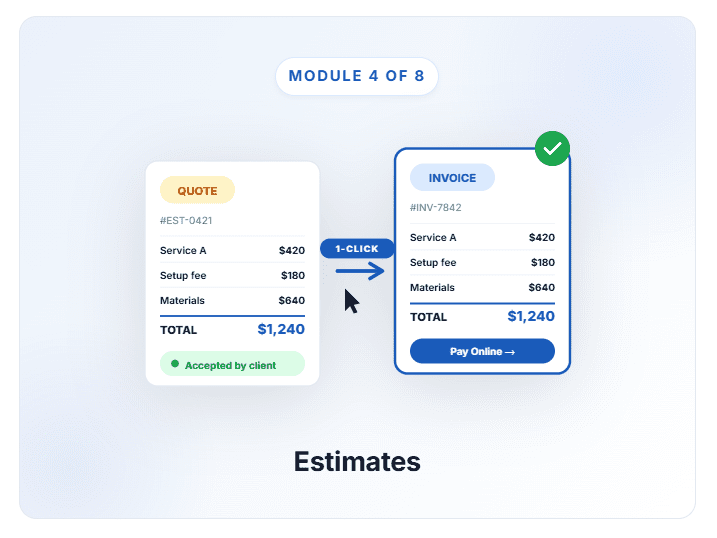
From quote to invoice in one click
What is QuickQore Estimates?
QuickQore Estimates is a branded quote builder for service businesses, contractors, and project-based teams. Each quote converts to a live invoice in one click the moment a customer accepts, eliminating the double entry that traps teams using disconnected proposal and accounting tools.
For service businesses, contractors, and project-based teams, the deal cycle starts with an estimate. QuickQore lets you build branded quotes that convert to live invoices the moment your customer says yes — no double entry, no copy-paste.
- Customizable estimate templates matching your invoice branding
- Estimate tracking — sent, viewed, accepted, declined, expired
- One-click conversion to invoice the moment a quote is approved
- Itemized line items with optional add-ons or tiered pricing
- Estimate-to-revenue forecasting tied directly to your sales pipeline
Track every expense, capture every receipt, automate every recurring bill
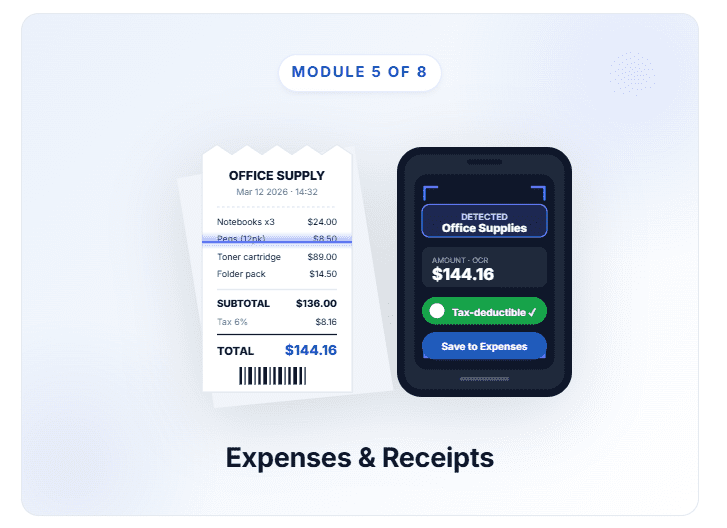
What is QuickQore Expenses & Receipts?
QuickQore Expenses & Receipts is a real-time expense module with OCR receipt capture, vendor management, recurring bill automation, and tax-deductible tagging. Mileage tracking feeds straight into the proprietary FLM Report — the only cloud bookkeeping platform to surface food, labor, and mileage cost in one view.
Expense tracking on most cloud platforms is an afterthought. QuickQore treats it as a first-class module: snap or upload receipts, auto-match them to expenses, tag deductible spending, and put recurring bills on autopilot.
- Real-time expense tracking — capture and categorize on the fly
- Receipt scanning & matching — OCR-extracted data attached automatically
- Tax-deductible tagging for end-of-year reporting
- Recurring expense management — rent, utilities, software subs auto-posted
- Vendor & supplier database with payment terms and contact info
- Mileage tracking integrated with the FLM Report
Real-time inventory that ties straight to your P&L
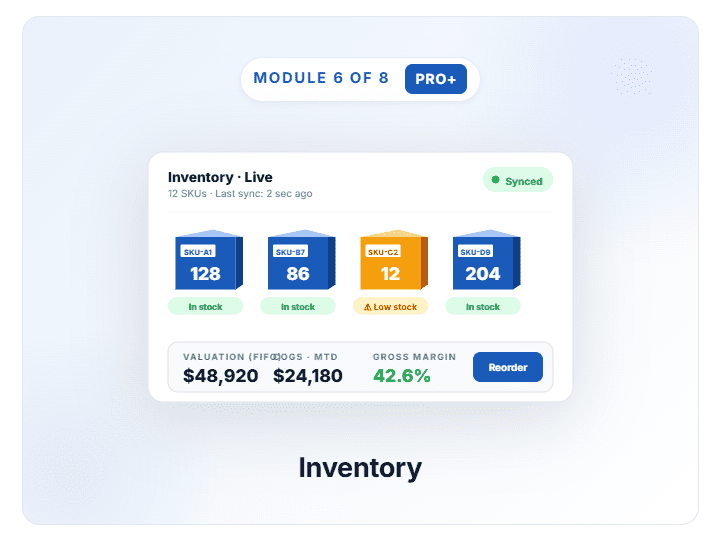
What is QuickQore Inventory?
QuickQore Inventory is a real-time stock tracking module for retail, restaurant, and product-based businesses. It supports FIFO and LIFO valuation, sends low-stock alerts, manages purchase orders, and posts cost-of-goods directly to the P&L — no manual journal entries, no end-of-month surprises.
For retail, restaurant, and product-based businesses, inventory cost is your biggest variable. QuickQore Inventory tracks live stock levels, supports FIFO and LIFO valuation, and feeds cost-of-goods directly into the financial statements — no manual journal entries, no end-of-month surprises.
- Live stock tracking — quantities update the moment a sale posts
- Comprehensive product catalog — SKU, cost, price, supplier, vendor
- Purchase order management from order through receipt
- FIFO and LIFO valuation — pick the method your CPA prefers
- Low-stock alerts sent to email or in-app when threshold hit
- Cost-of-goods reporting tied directly to gross margin on the P&L
The reports your CPA, your franchisor, and your tax software actually need
What is QuickQore Reports?
QuickQore Reports is a financial reporting module with pre-built P&L, balance sheet, cash flow, equity, sales-by-item, and customizable reports — refreshed live the moment a transaction posts. No nightly batches. No “data is one day old” gap when your CFO or franchisor asks for numbers.
QuickQore reports refresh in real time the moment any transaction posts — no nightly batch, no “data is one day old” surprises. Pre-built financial statements pass to your CPA in tax-ready format, and custom reports let operators answer the specific questions only their business asks.
- Pre-built financials — P&L, balance sheet, cash flow, equity
- Customizable reports — design your own metrics, save as templates
- Real-time refresh — never out of sync with your bank or your books
- Comparative analysis — period-over-period and year-over-year, charted
- Sales-by-item / by-customer drill-down for profitability analysis
- Export & sharing — PDF, Excel, or share-by-link with read-only access
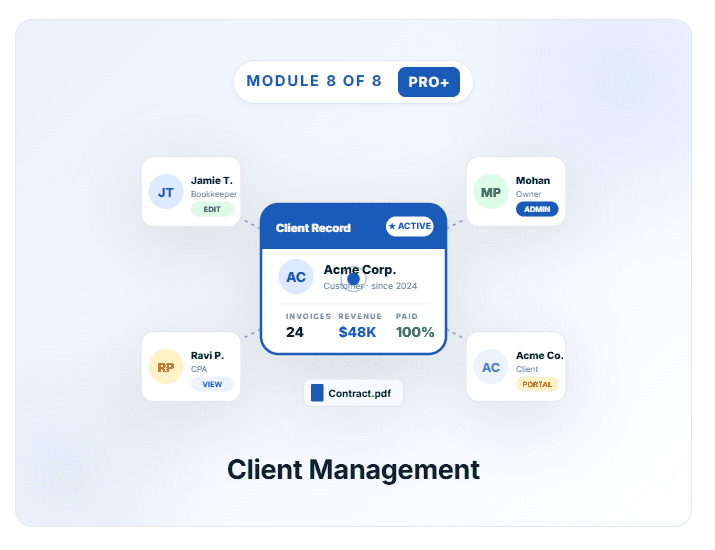
A built-in CRM that keeps relationships, jobs, and invoicing aligned
What is QuickQore Client Management?
QuickQore Client Management is a built-in CRM that ties every customer record to its invoices, estimates, payments, and documents — with role-based multi-user access and a secure read-only portal for clients. No separate CRM subscription, no per-seat fees, no integration fragility.
You shouldn’t need a separate CRM to know which customer owes what, which estimates are open, and which invoices are overdue. QuickQore’s Client Management module ties customer records directly to every invoice, estimate, payment, and document — with role-based access for your team and a portal for clients.
- Comprehensive client database — unlimited contacts, billing addresses, notes
- Document management — attach contracts, agreements, terms to records
- Client invoice history — complete invoice and payment record per customer
- Multi-user role-based access — view, edit, admin permissions
- Client portal — share selected reports with clients via secure link
- Activity timeline — every interaction logged with date and user
Capture → Validate → Finalize — in under 60 seconds
Every transaction in QuickQore moves through the same four-step workflow, whether it’s a $12 receipt or a $48,000 multi-location bank deposit. The whole loop takes under a minute. That’s why owners who switch from QuickBooks Online or Xero recover 5–10 hours of bookkeeping time every month.
Answer
The QuickQore One-Minute Workflow is a four-step transaction-processing system — Capture, Validate, Categorize, Finalize — that posts any business transaction to the right entity, location, and ledger account in under 60 seconds. The workflow is the same for receipts, bank deposits, expense bills, customer invoices, and bulk sales uploads, which is why QuickQore replaces the manual journal-entry work that costs multi-location operators 5–10 hours a month on legacy platforms.
1
Capture
~10 seconds
- Phone camera receipt OCR
- Bank-feed auto-import
- POS & CSV bulk upload
- Forwarded-email receipt parsing
2
Validate
~15 seconds
- OCR-extracted amount & date verification
- Duplicate-transaction detection
- Entity & location auto-tag
- Anomaly alerts before posting
3
Categorize
~15 seconds
- Smart vendor-based category suggestions
- Franchise CoA auto-mapping (30+ brands)
- Multi-location auto-split rules
- Tax-deductible & class tagging
3
Finalize
~15 seconds
- Real-time GL post on commit
- Live P&L, BS, cash flow refresh
- FLM Report auto-update by location
- Audit-trail entry with user & timestamp
Total time:
55–60 seconds per transaction — the same workflow for $12 receipts and $48,000 multi-location deposits. That’s how a 20-location operator gets month-end closes done in hours instead of days.
Multi-Location & Multi-Entity Accounting
Run a franchise, a multi-store retailer, or a multi-entity holding company? This is the layer that competitors charge enterprise prices for — and we include it in the Business plan at $75/month for unlimited locations.
Answer
QuickQore Multi-Location & Multi-Entity Accounting is the proprietary infrastructure layer that lets one login manage 100+ locations or entities under one company. It includes bulk sales upload, single-bank-file auto-split, five shared-expense allocation methods, per-location P&L, and the exclusive FLM Report — all included in the $75/month Business plan, with no per-location surcharge.
The FLM Report — live every minute, every location
FLM Report · Bensalem #4421 · MTD
Food cost
- 28.4%
- on target
Labor cost
- 26.1%
- on target
Mileage cost
- 7.6%
- on target
FLM Total
- 62.1%
- ▼ better than target
Bulk Sales Upload
Bulk Sales Upload: one CSV, every location posted automatically
Shared Expense Allocation
5 methods (equal, % revenue, sq ft, headcount, custom)
Single Bank File Auto-Split
upload one statement, distributed by your rules
Per-Location P&L
single store, region, or consolidated — one click
Franchise Royalty Reports
30+ franchise charts of accounts pre-built
Multi-Entity Selector
switch between 100+ entities in two clicks
Multi-Location & Multi-Entity Accounting
Run a franchise, a multi-store retailer, or a multi-entity holding company? This is the layer that competitors charge enterprise prices for — and we include it in the Business plan at $75/month for unlimited locations.
Answer
QuickQore Multi-Location & Multi-Entity Accounting is the proprietary infrastructure layer that lets one login manage 100+ locations or entities under one company. It includes bulk sales upload, single-bank-file auto-split, five shared-expense allocation methods, per-location P&L, and the exclusive FLM Report — all included in the $75/month Business plan, with no per-location surcharge.
Built by working bookkeepers, not ex-tech executives
QuickQore was designed inside a real bookkeeping practice managing 250+ small business clients. Every feature on this page started as a problem we lived through ourselves.
Answer
QuickQore was founded in 2023 by Mohan Patel, a Pennsylvania-based bookkeeper and multi-unit Pizza restaurant franchise with 18+ years of accounting experience. Every feature was tested against 250+ live client books before launch, including 30+ pre-built franchise charts of accounts and SOC 2-aligned security — making QuickQore the only cloud bookkeeping platform built end-to-end inside an active multi-location operation.
Founder accounting experience
Live client books tested before launch
Franchise charts of accounts pre-built
Aligned security & encryption
How QuickQore stacks up against the competition
Multi-location and multi-entity tooling that costs enterprise dollars elsewhere is included in QuickQore at SMB prices.
Answer
For multi-unit operators and franchise owners, QuickQore is a direct alternative to QuickBooks Online, Xero, and Wave. The platform delivers desktop-style cloud UX, native multi-entity and multi-location accounting, the proprietary FLM Report, and one-CSV bulk sales upload — capabilities that legacy SaaS competitors either gate behind enterprise tiers, charge per-location for, or do not offer at all. A 10-location operation costs around $900/year on QuickQore versus $4,200+ on QuickBooks Online.
Feature
Starting price
Multi-entity (multiple companies in one login)
Multi-location accounting
Bulk sales upload (one CSV → all locations)
Single bank file auto-split
FLM Report (Food / Labor / Mileage)
Franchise royalty reporting
Desktop-style UX in cloud
30-day free trial, no credit card
Typical 10-location annual cost
QuickQore
$5/mo
Unlimited on Business+
Included on Business+
Native
Native
Proprietary
30+ pre-built brands
Yes
Yes
~$900

$35/mo
Per-license
Tier-limited
Manual per transaction
Not supported
Not available
Manual setup
Web-simplified
Card required
~$4,200+
Xero
$20/mo
Per-license
Tier-limited
Manual
Not supported
Not available
Manual setup
Web-simplified
Card required
~$2,400+

Free / freemium
Not supported
Not supported
Not supported
Not supported
Not available
Not supported
Web-only
Free tier
Free
Pricing and feature availability current as of May 2026. Competitor information sourced from publicly listed pricing pages.
Which features come on which plan?
Every paid plan gets the core eight modules. Multi-location and the FLM Report ride on Business and above. See full pricing →
Answer
QuickQore offers four plans: Starter at $5/month (Invoicing, Payments, Accounting, Estimates, Expenses), Pro at $30/month (adds Inventory, Reports, Client Management), Business at $75/month (adds Multi-Location, FLM Report, Bulk Sales Upload, Franchise Royalty Reports), and Enterprise at $199/month (adds SSO, API access, white-label, dedicated account manager). All plans include a 30-day free trial with no credit card.
| Feature | Starter $5/mo | Pro $30/mo | Business $75/mo | Enterprise $199/mo |
|---|---|---|---|---|
|
Invoicing & Payments |
✓ |
✓ |
✓ |
✓ |
|
Accounting & Bank Reconciliation |
✓ |
✓ |
✓ |
✓ |
|
Estimates |
✓ |
✓ |
✓ |
✓ |
|
Expenses & Receipts |
✓ |
✓ |
✓ |
✓ |
|
Inventory |
— |
✓ |
✓ |
✓ |
|
Custom Reports |
— |
✓ |
✓ |
✓ |
|
Client Management (CRM) |
— |
✓ |
✓ |
✓ |
|
Multi-Entity |
Up to 20 |
Up to 20 |
Up to 50 |
100+ |
|
Multi-Location Accounting |
— |
— |
✓ |
✓ |
|
FLM Report (proprietary) |
— |
— |
✓ |
✓ |
|
Bulk Sales Upload |
— |
— |
✓ |
✓ |
|
Franchise Royalty Reports |
— |
— |
✓ |
✓ |
|
Priority Support |
Email |
Email + Chat |
24-hr SLA |
Dedicated manager |
|
SSO / API / White-Label |
— |
— |
— |
✓ |
Why QuickQore wins for small & multi-location businesses
Answer
Six core benefits separate QuickQore from generic cloud accounting software: real-time reporting on every transaction post, SOC 2-aligned encryption, vertical scalability from 1 to 100+ entities, tax-ready financial statements, true device-anywhere access, and built-in multi-user collaboration with no per-seat fees. Each one is the direct outcome of a problem the founding team lived through running a 250-client bookkeeping practice.
Real-time everything
Reports refresh the moment a transaction posts. No nightly batch. No “the data is one day old” surprises when your CFO asks for numbers.
SOC 2-aligned security
Encrypted at rest and in transit, daily backups, role-based access, and full audit trails on every transaction. Built so your accountant signs off without flinching.
Scales with your business
One shop today, twenty locations next year, a hundred entities by 2030 — same platform, same login, same workflow. No painful migrations.
Tax-season ready
P&L, balance sheet, cash flow — CPA-ready by default. Tax reports update quarterly to reflect current accounting standards. Hand off books in one click.
Works from anywhere
100% cloud-native. Sign in from any browser, tablet, or phone. No installations. No remote-desktop hosting fees. No version mismatches between team members.
Built-in multi-user collaboration
Owner, bookkeeper, accountant, manager — everyone gets a role-based login at no extra cost. Invite your CPA in seconds, give clients portal access, control everything in one place.
Frequently Asked Questions about QuickQore Features
Quick answers to the most common questions multi-location operators and SMB owners ask before signing up.
Answer
The most common questions about QuickQore involve multi-location support, the FLM Report, bulk sales upload, single-bank-file auto-split, franchise royalty automation, the desktop-style UX, shared expense allocation, inventory tracking, the free trial, QuickBooks data import, POS integrations, and 20-location pricing. Every question below is answered in 1-3 sentences and indexed in the FAQPage schema for AI search engines.
Does QuickQore support multiple locations in one account?
Yes. Multi-Entity accounting is included on every paid plan (up to 20 entities on Starter and Pro, 50 on Business, and 100+ on Enterprise). Full Multi-Location Accounting — with location tagging, bulk sales upload, shared expense allocation, and the proprietary FLM Report — is included on Business and Enterprise plans.
What is the FLM Report and why is it unique to QuickQore?
The FLM Report is QuickQore’s proprietary dashboard that surfaces Food, Labor, and Mileage cost — the three largest variable cost categories for restaurants, franchises, and delivery operators — broken down by location and shown as a live percentage of revenue.
It is not available in QuickBooks Online, Xero, FreshBooks, or Wave. It was built inside Mohan Patel’s multi-unit Pizza restaurant franchise operation, then formalized as a standard report in QuickQore.
Can I bulk-upload sales from multiple locations at once?
Yes. Bulk Sales Upload accepts a single CSV and posts transactions to the correct locations automatically — no per-location data entry required. Supported on Business and Enterprise plans.
How does QuickQore split a single bank statement across multiple locations?
Upload one bank file. QuickQore applies your allocation rules to distribute transactions automatically by location, cost center, or custom attribute. You no longer need to post each transaction manually for each location, which is how a typical multi-location operator loses 5–10 hours per month on QuickBooks Online.
Can QuickQore automate franchise royalty reporting?
Yes. QuickQore includes 30+ pre-built franchise charts of accounts (Pizza restaurant franchise, Domino’s, Pizza Hut, Marco’s, Little Caesars, Dunkin’, Subway, and more) plus automated royalty report templates. Set your royalty percentage once and QuickQore generates the monthly export automatically.
Why does QuickQore have a desktop-style interface in the cloud?
Most working bookkeepers and accountants learned on QuickBooks Desktop. We brought desktop familiarity to the cloud — same speed, same density of information, same workflow speed — without the headache of remote-desktop hosting or per-user license fees. Translation: your existing bookkeeper doesn’t have to relearn anything.
How does QuickQore allocate shared expenses across locations?
QuickQore supports five built-in allocation methods: equal split, percentage of revenue, square footage, headcount, and custom. Configure once; journal entries auto-distribute monthly across all locations. This single feature replaces hours of manual journal-entry work for multi-unit operators.
Can I track inventory alongside accounting?
Yes, on the Pro plan and above. QuickQore Inventory includes real-time stock tracking, low-stock alerts, FIFO and LIFO valuation methods, purchase order management, and cost-of-goods reporting tied directly to your P&L — no manual journal entries required at month-end.
Is there a free trial of QuickQore?
Yes. A full 30-day free trial is available on every paid plan. No credit card is required. Trial data is preserved for 60 days after expiration so you can resume if you choose to subscribe later.
Can I import my data from QuickBooks Online or QuickBooks Desktop?
Yes. QuickQore imports your chart of accounts, customers, vendors, items, and historical transactions automatically from QuickBooks Online and QuickBooks Desktop. The QuickQore support team helps validate the import during your free trial — at no extra cost.
What POS systems integrate with QuickQore?
QuickQore integrates directly with Square, Toast, and Clover. For other POS systems, sales can be exported as CSV and uploaded in bulk — including across multiple locations in a single file. New POS integrations are added quarterly based on customer demand.
How much does QuickQore cost for a 20-location franchise?
One QuickQore Business subscription at $75/month covers all 20 locations — about $900/year total. The same setup on QuickBooks Online would require one entity license per location ($35/month each = $700+/month). QuickQore is built so multi-location pricing scales with your business, not against it.
Try every feature free for 30 days
No credit card. No commitment. Full access to all eight modules — including Multi-Location Accounting and the FLM Report on the Business plan trial.